
Free XML Sitemap URL Extractor
Parse XML sitemaps into clean URL lists instantly. Extract links for bulk indexing verification and technical SEO audits. Supports TXT, CSV, and PDF export.
Transform Messy Code into Actionable Data
https://site.com/page1
https://site.com/page2
https://site.com/about
https://site.com/contact
...
What is a Sitemap URL Extractor?
A Sitemap URL Extractor is a specialized SEO tool designed to parse XML sitemap files and retrieve a clean, plain-text list of all containing URLs.
Unlike viewing the raw XML code, which is cluttered with metadata like <lastmod> and <priority> tags, an extractor strips away the code to give you a raw list of links.
If you’re new to sitemaps, Google’s official documentation is the best starting point:
Sitemaps overview (Google Search Central).
This tool is essential for SEO professionals who need to perform bulk audits, check indexing status, or verify site migrations without manually copying hundreds of links. Parsing can sometimes fail due to firewalls, redirects, invalid XML, or server errors. Study the table, which lists the main causes of parsing problems and ways to solve them. For additional trusted references, see the official Sitemaps XML protocol (sitemaps.org) and the Google Search Console sitemap help page.
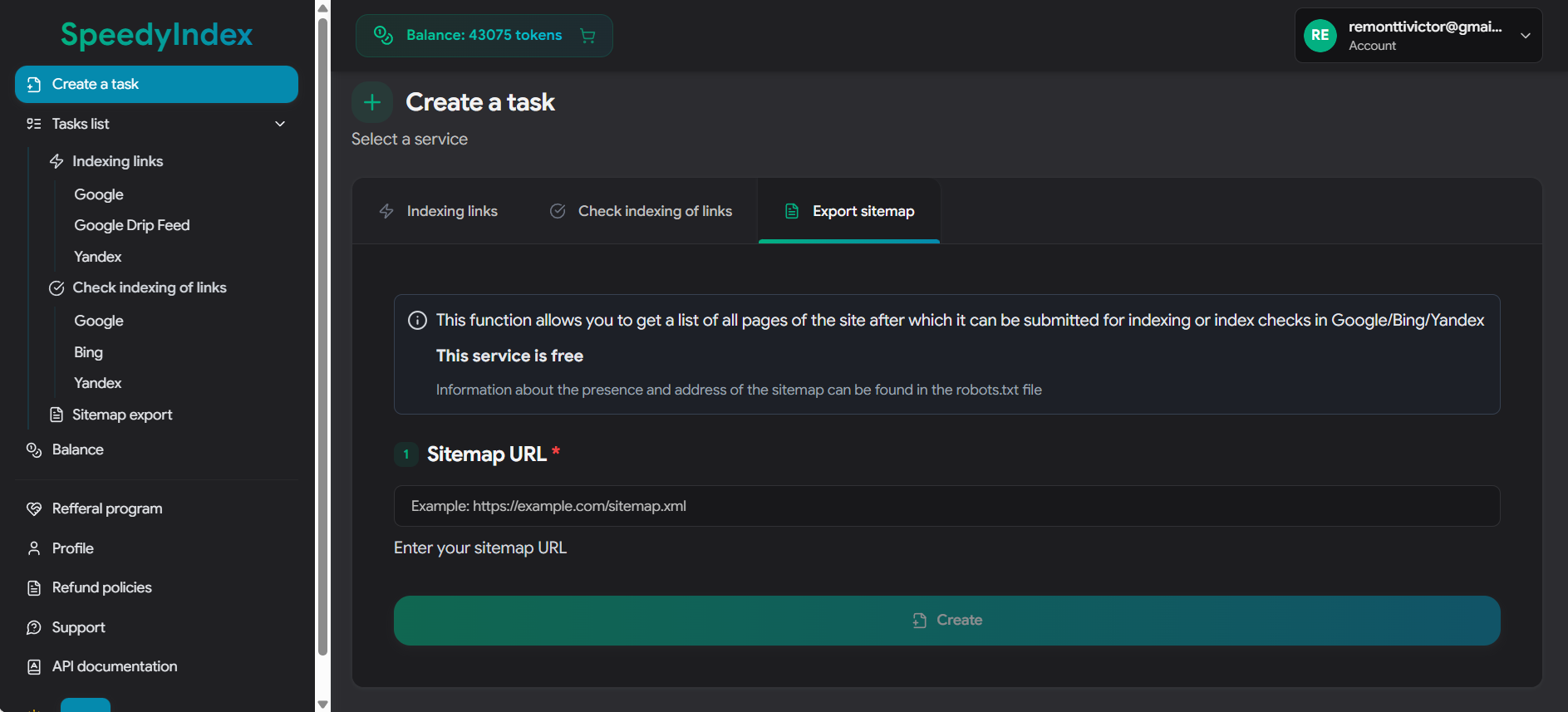
Enter the link to your XML sitemap (e.g., https://site.com/sitemap.xml).
See Sitemap Export in Action
Watch this short tutorial to see how easily you can extract all URLs from your XML sitemap for bulk indexing or checking.
⚡ Why do this manually? Automate it in the Dashboard.
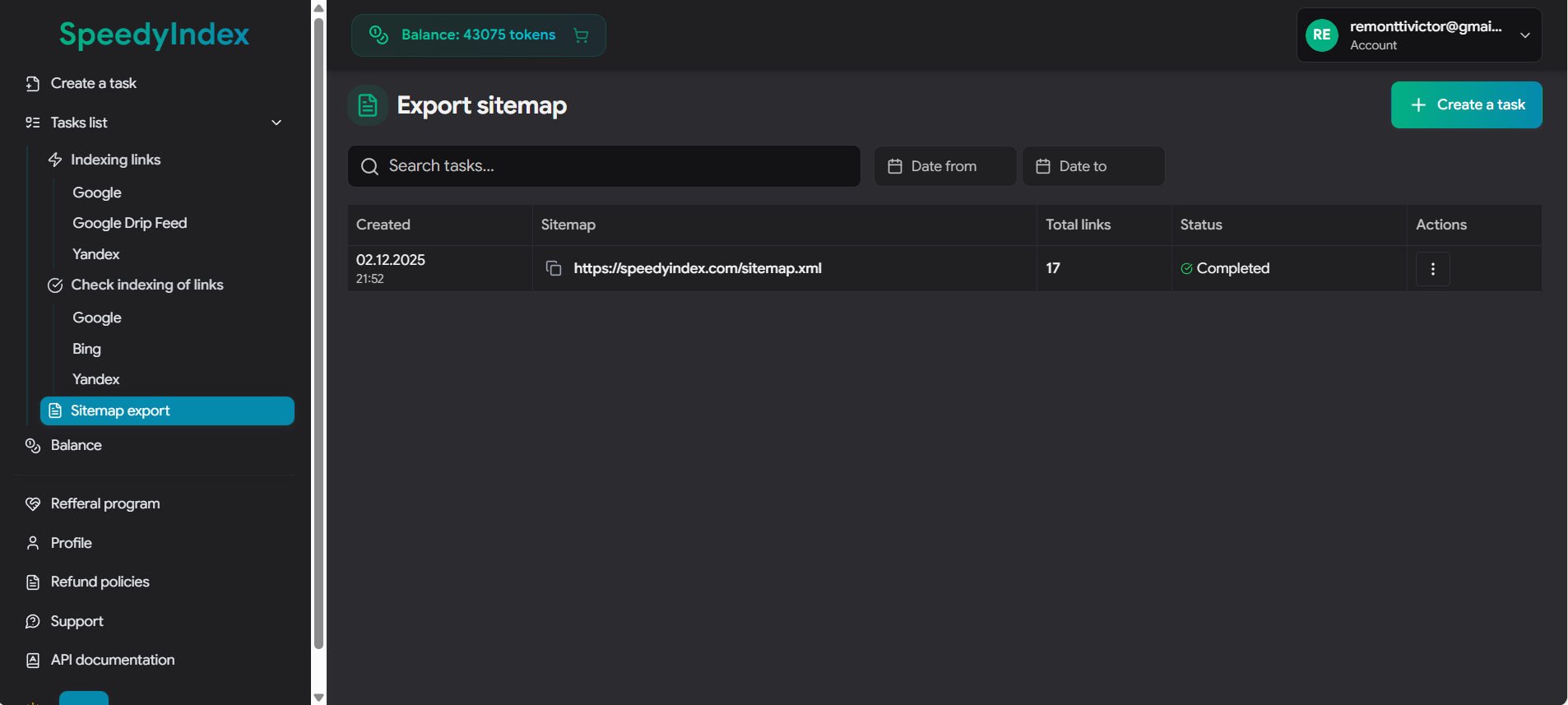
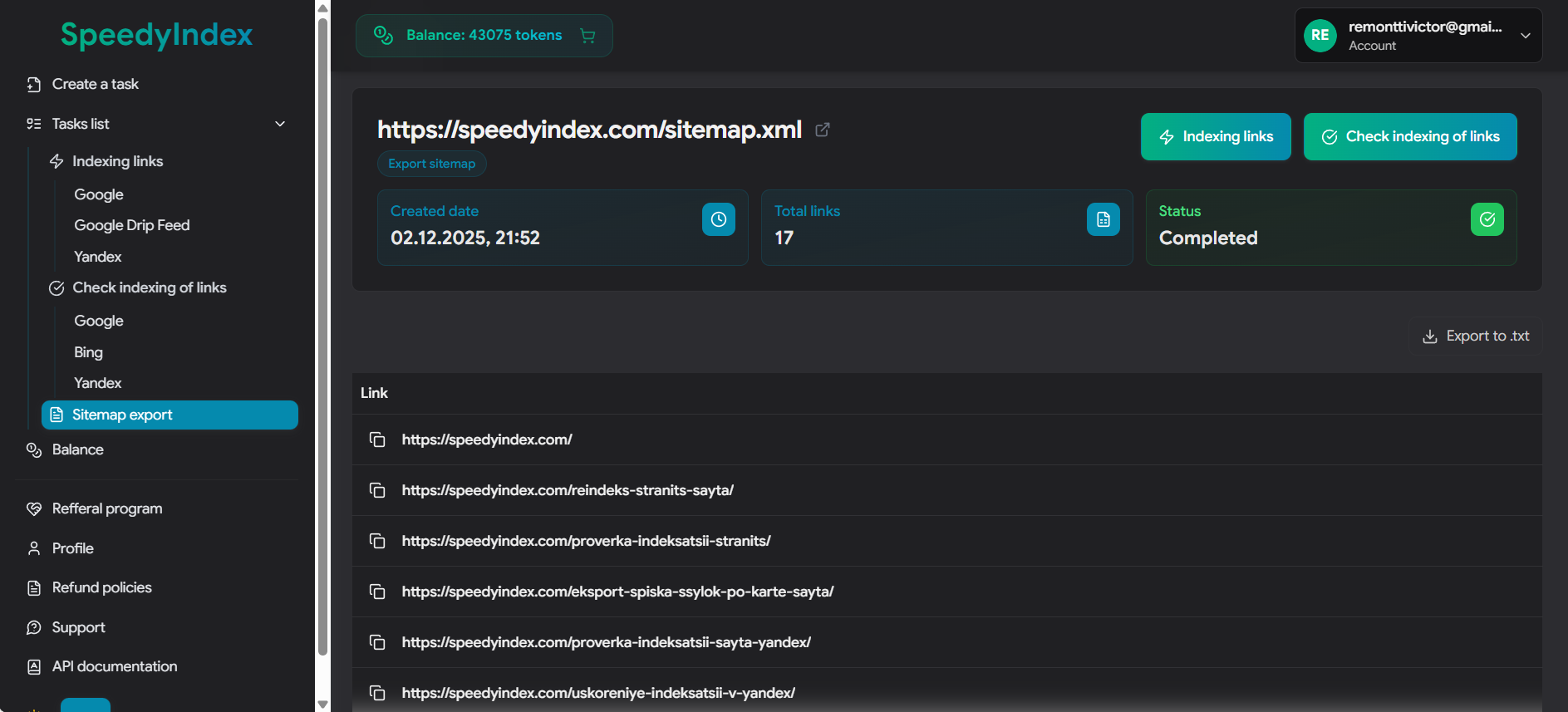
This tool on the current page gives you a text file. That's fine for small tasks. But inside the SpeedyIndex Web App, you get a complete workflow without the copy-paste mess:
- ✅ Extract & Analyze: Import sitemaps directly into your project.
- 🔍 Instant Check: Select the extracted links and run a Bulk Index Check (Google, Bing, or Yandex) immediately.
- 🚀 One-Click Indexing: Found unindexed pages? Send them to the Indexing Service right away. For larger sitemap exports, you can submit large URL lists gradually.
Post-Extraction Audit Workflows
Once you have extracted the URL list, proceed with the following technical audits to ensure site health.
1. Verify Indexation Status
Ensure submitted URLs are actually served by search engines. Unindexed sitemap URLs indicate quality or technical blocks.
Check Google Index →2. Audit Response Codes
Scan the list for broken links (404) or server errors (5xx) that waste crawl budget.
3. Validate Migration
Compare the extracted list against the new site structure to confirm 301 redirects are functioning correctly.
Migration Checklist →Comprehensive List of Sitemap URL Patterns
If the standard /sitemap.xml returns a 404 error, webmasters often use alternative naming conventions based on their CMS or server configuration. Use this reference table to manualy locate the file.
| URL Pattern | Platform / Use Case |
|---|---|
/sitemap.xml |
The Standard. Used by Shopify, Wix, Squarespace, Webflow, Ghost, and most static HTML sites. |
/sitemap_index.xml |
WordPress (Plugins). The default for Yoast SEO, RankMath, and All in One SEO. Also used for large sites splitting data into multiple files. |
/wp-sitemap.xml |
WordPress (Native). Used by WordPress versions 5.5+ if no third-party SEO plugin is installed. |
/sitemap.php |
Dynamic PHP Sites. Common in custom forums (vBulletin, XenForo) or bespoke PHP scripts generating XML on-the-fly. |
/sitemap.txt |
Plain Text. Used by older systems or simple static sites (Yahoo! style). Contains one URL per line. |
/1_index_sitemap.xml |
PrestaShop. Often prefixed with a number representing the store ID or language ID (e.g., 2_index_sitemap.xml). |
/sitemap.xml.gz |
Compressed. Used by high-volume sites (e.g., news portals) to save bandwidth. Must be unzipped before parsing. |
/feeds/posts/default?orderby=updated |
Blogger (Blogspot). The default Atom feed used as a sitemap for Google. |
/sitemap/sitemap.xml |
Frameworks. Common structure for Django, Laravel, or sites organizing assets in subfolders. |
/news-sitemap.xml |
Google News. Specific file for publishers, containing articles published in the last 48 hours. |
/image-sitemap.xml |
Image SEO. Dedicated file for CDN links and media assets (often used by photography portfolios). |
If none of the above work, check the
/robots.txt file (e.g., example.com/robots.txt). Webmasters are required to declare the sitemap location there using the directive: Sitemap: https://example.com/custom-name.xml.
Why your sitemap.xml won’t download or parse: troubleshooting checklist
If the tool can’t fetch your sitemap (Fetch from URL) or you get an empty URL list, the cause is almost always one of these: anti-bot blocking (Cloudflare/WAF), the wrong file format (gzip/HTML instead of XML), XML syntax errors, redirects and bad HTTP status codes (3xx/4xx/5xx), SSL/TLS problems, encoding issues, or a non‑standard sitemap structure. Below is a detailed checklist that fully answers: “Why can’t I download/parse my sitemap?”
| Issue type | Why it fails (symptom) | What to do (fix) |
|---|---|---|
| Compressed sitemap (.gz) |
The URL returns a .gz file (binary). A browser may display it, but automated fetching/copying often returns the wrong format.
|
Download and unzip it locally (7‑Zip, etc.). Then use the “Paste XML Code” tab, or paste the unzipped XML. |
| Cloudflare / WAF / anti-bot (403 Forbidden) | The server blocks automated requests (cURL/fetch): 403, CAPTCHA, JS challenge, Bot Fight Mode, ModSecurity/WAF rules. Sometimes it opens in your browser but the tool can’t fetch it. |
Open the sitemap in your browser, press Ctrl+U (View Source), copy the raw XML, and paste it into the “Paste XML Code” tab.
Also check if your WAF is blocking by User‑Agent, country, or ASN.
|
| HTML returned instead of XML (error/login page) |
The sitemap URL actually returns HTML: a 404 page, login wall, “Access denied”, an anti-bot page, or a custom error page.
The parser can’t find <loc> tags.
|
Open the URL and check “View Source”. A real sitemap should be XML with <urlset>/<sitemapindex> and <loc>.
If it’s HTML, fix the sitemap URL or server access rules.
|
| Redirects (301/302/307/308), chains, or loops | The sitemap URL goes through multiple redirects or gets stuck in a loop. The final URL may end up as 403/404, or redirect to a different domain/protocol/version. |
Make sure the final URL returns 200 OK and XML. Shorten redirect chains and use the canonical sitemap URL
(usually HTTPS + your preferred WWW/non‑WWW version).
|
| SSL/TLS issues (certificate, SNI, outdated ciphers) | HTTPS is enabled, but the certificate is expired/invalid, the chain is broken, SNI is misconfigured, or TLS settings are outdated. Browsers may still load it, while automated clients fail the handshake. | Fix the SSL certificate and TLS configuration (full chain, modern protocols). Confirm the sitemap loads over HTTPS without warnings. |
| Server errors (5xx), timeouts, unstable hosting | The server returns 500/502/503/504, times out, or responds too slowly while downloading the sitemap. | Check server logs and limits (PHP/CPU/RAM), CDN/origin settings, and response size. Add caching, increase resources, or split the sitemap into smaller files. |
| Access restrictions (401/403), Basic Auth, staging site | The sitemap requires login (Basic Auth/tokens) or is blocked by IP/geo rules. The tool receives 401/403. | Make the sitemap publicly readable (at least for search engine bots). For staging, either remove the sitemap or protect it intentionally. |
| Wrong format: RSS/Atom/JSON instead of Sitemap XML |
The URL looks like a sitemap, but it’s actually a feed or an API response. It doesn’t follow the Sitemap Protocol and may not contain <loc>.
|
Find the real sitemap: check /robots.txt for a Sitemap: line and try common paths
(/sitemap.xml, /sitemap_index.xml, /wp-sitemap.xml).
|
| Invalid XML (syntax errors) |
Unclosed tags, broken namespaces, unescaped characters (like & instead of &),
or extra text before the first <.
|
Validate the XML (for example, with a W3C XML validator), fix the syntax, and try again. If there’s junk before the XML starts, remove it and keep only the XML document. |
| Encoding problems (BOM, wrong encoding declared) |
The file contains a BOM, uses a weird encoding, or has an incorrect encoding declaration that breaks parsing.
|
Save the file as UTF‑8 (no BOM) and confirm the header is correct:
<?xml version="1.0" encoding="UTF-8"?>. Then paste the XML manually.
|
| Sitemap is too large (size / browser limits) | The file is huge (tens of MB). The browser may run out of memory, freeze, or fail to process the entire list. | Split the sitemap into smaller files (best practice: up to 50,000 URLs per file) and use a Sitemap Index, or process it in chunks. |
| You uploaded a Sitemap Index (not a page URL sitemap) | It only contains links to other sitemaps (child sitemaps), not actual page URLs—so you might not see page URLs in the output. | Extract the child sitemap URLs first, then parse each child sitemap to get the final page URL list. |
| Missing <loc> tags / non-standard sitemap structure |
The sitemap is generated incorrectly (no <loc> tags), or it’s a custom XML file that doesn’t follow the Sitemap Protocol.
|
Fix sitemap generation in your CMS/plugin. On WordPress, check your SEO plugin (Yoast/RankMath) or the native /wp-sitemap.xml.
|
| CDN/cache returns different content (varies by geo/UA) | The server returns different responses depending on User‑Agent, country, or other rules—XML for some requests, HTML/errors for others. | Review CDN/WAF rules (UA/Geo variations), and allow sitemap access without strict bot checks. Make sure it always returns the same XML with a 200 status. |
| Rate limiting (429 Too Many Requests) | The server limits request frequency and returns 429. This is common on low-resource hosting or strict security setups. | Increase limits, add caching, and whitelist sitemap access. If fetching still fails, use manual XML paste as a fallback. |
Who is this tool for?
An XML sitemap extractor saves hours of manual work: you get a clean URL list and use it for technical SEO, index coverage checks, link building workflows, content audits, and migration QA—without crawling the entire site or copy‑pasting URLs.
Technical SEO auditors
Quickly pull a sitemap URL list for a technical audit: check HTTP status codes (404/410/5xx), spot redirects and 301/302 chains, catch duplicates and canonical issues, and verify whether robots.txt or noindex is blocking indexation. This directly impacts crawl budget, crawl frequency, and overall index coverage.
Example: export sitemap URLs and run a bulk status/redirect check to see which site sections are failing and where crawl is being wasted—in 10–15 minutes.
Site migrations & redesign QA
When you change domains, move HTTP→HTTPS, switch WWW vs non‑WWW, or rebuild site structure, you want every old URL to map cleanly to the right new URL via a 301—without loops or long redirect chains. A sitemap-based URL list is the fastest way to validate the migration end-to-end.
Example: extract the old domain’s sitemap URLs and compare them to the new structure: which pages redirect correctly to relevant equivalents, and which ones land on a 404 or a messy redirect chain.
Content teams & editors
Great for content inventory and content auditing: collect all posts/pages into one spreadsheet, group them into topic clusters, detect duplicates and keyword cannibalization, and plan refreshes, internal linking, and meta tag improvements.
Example: export blog URLs from the sitemap and build a Google Sheets tracker: index status, traffic, last update date, owner, and an action plan for improvements.
Link building & placement verification
If you buy links, publish guest posts, or run PR placements, you need to know the donor pages are actually indexed in Google and don’t quietly drop out of the SERPs. A sitemap extractor helps you collect a donor site’s URL pool fast, assess donor page quality, run backlink audits, and understand where you’re likely retaining real link equity. It’s also useful for competitor research and finding competitor donor sites.
Example: parse a donor site’s sitemap, find “blog / news / articles” sections, then verify that pages with your placements/backlinks are indexed (and haven’t been deindexed).
Ecommerce & large catalogs
For ecommerce sites, sitemaps are a fast source of category and product URLs. This makes it easier to review index coverage, find URL parameter issues, filter pages (faceted navigation), pagination problems, and duplicate pages that waste crawl budget and slow down indexing.
Example: export product sitemap URLs and category sitemap URLs separately, then compare index coverage: what’s indexed vs what’s missing due to duplicates, canonicals, parameters, or crawl budget limits.
PBN, expired domains, and niche research
When working with expired domains, site rebuilds, or PBN setups, you often want a quick read on site structure and any “residual index.” If a sitemap is available, the URL list is perfect for fast screening: what pages exist, what’s likely indexable, and what’s worth rebuilding first.
Example: before buying or rebuilding a domain, extract sitemap URLs (if available), check which pages are indexed, review the structure, and prioritize the sections to restore.
Frequently Asked Questions
Why does the tool fail to fetch my sitemap?
Fetching failures are usually caused by server-side firewalls (like Cloudflare or ModSecurity) blocking automated requests. If this happens, open the sitemap in your browser, copy the source code (Ctrl+U), and use the "Paste XML Code" tab manually.
Can I extract URLs from a Sitemap Index file?
Yes. If you provide a Sitemap Index (a parent file linking to other sitemaps), the tool will extract the locations of the child sitemaps. You will then need to process each child sitemap individually to get the final page URLs.
Does this support Image or Video sitemaps?
Yes. The parser looks for standard location tags. For Image Sitemaps, it extracts the parent page URL. It supports standard XML namespaces used by WordPress, Shopify, and Magento.
How many URLs can I extract at once?
The tool runs in your browser and can comfortably handle files up to 10MB (approx. 50,000 URLs). For extremely large files, we recommend splitting them or increasing your browser's memory allocation.
Does the extractor preserve Hreflang attributes?
Currently, this tool extracts the primary <loc> (location) tag for indexation checking. It does not parse <xhtml:link> attributes for alternate languages to keep the output clean for bulk auditing tools.
Why is the Last Modified date important?
Google uses the <lastmod> tag to determine if a page has changed since the last crawl. However, this extractor strips metadata to provide a raw URL list, which is the required format for bulk index checkers and crawlers.
Is the extracted data safe?
Yes. The parsing happens locally in your browser (client-side) or via a stateless proxy. We do not store or log your sitemap data.
How to get sitemap URL?
Start with the two fastest checks: (1) open https://example.com/robots.txt and look for a Sitemap: line, (2) try common paths like /sitemap.xml, /sitemap_index.xml, or /wp-sitemap.xml (WordPress). Many CMS platforms also link the sitemap in their SEO plugin settings.
How to get XML data from a website?
Open the XML URL directly in your browser (for example, a sitemap URL). If the site blocks automated fetching (403/WAF), use Ctrl+U (View Source) to copy the raw XML, then paste it into the “Paste XML Code” tab. This avoids CORS issues and many fetch restrictions.
Are sitemaps still relevant in 2026?
Yes. XML sitemaps are still a key technical SEO file for discovery and crawl prioritization—especially for large sites, ecommerce catalogs, news sites, and projects with frequent updates. Sitemaps don’t guarantee indexation, but they help search engines find important URLs, understand update signals (<lastmod>), and reduce missed pages during crawling.
How to get URL from XML file?
In a standard sitemap, URLs are stored inside the <loc> tag. This tool extracts all <loc> values and outputs a clean, one‑URL‑per‑line list you can copy or export to TXT/CSV/PDF.
How to download sitemap.xml file?
Open the sitemap URL in your browser (for example https://example.com/sitemap.xml). Then either (1) right‑click → “Save as…”, or (2) open DevTools → Network, reload the page, click the sitemap request, and save the response. If downloading is blocked by WAF, use Ctrl+U (View Source) and copy the raw XML.
Does Google have a sitemap generator?
Google doesn’t provide a universal “generate sitemap” button in Search Console. In practice, sitemaps are generated by your CMS (WordPress, Shopify, Magento, etc.), an SEO plugin (Yoast/RankMath), or your backend/framework. Once generated, you submit the sitemap URL in Google Search Console.
How to download XML from browser?
If the XML opens in the browser, you can usually right‑click and choose “Save as…”. If that doesn’t work, use Ctrl+U (View Source) to get the raw XML and copy it, or use DevTools → Network to open the request and copy/save the response body.
How to use an XML sitemap?
Typical workflow: (1) generate the sitemap in your CMS/SEO plugin, (2) make sure it returns 200 OK and contains valid <loc> URLs, (3) submit it in Google Search Console, (4) monitor coverage and indexing statuses, and (5) export URLs for bulk audits (index checks, response code checks, redirect validation, migration QA). This extractor helps with step (5) by turning XML into a clean URL list.